Announcing Stride 4.4

Stride 4.4 is one of the largest updates the engine has seen in years, with a modernized shader pipeline, overhauled Vulkan and Direct3D APIs, massive improvements to non-Windows platform support, a new CLI tool and much more.
Table of Contents:
Download and Upgrade 🔗
You can download Stride 4.4 today from the launcher. Release notes are available here.
What's new in this release 🔗
Here are just a few of the most notable changes. For a more detailed write-up, checkout the full release notes.
📱 Platform support 🔗
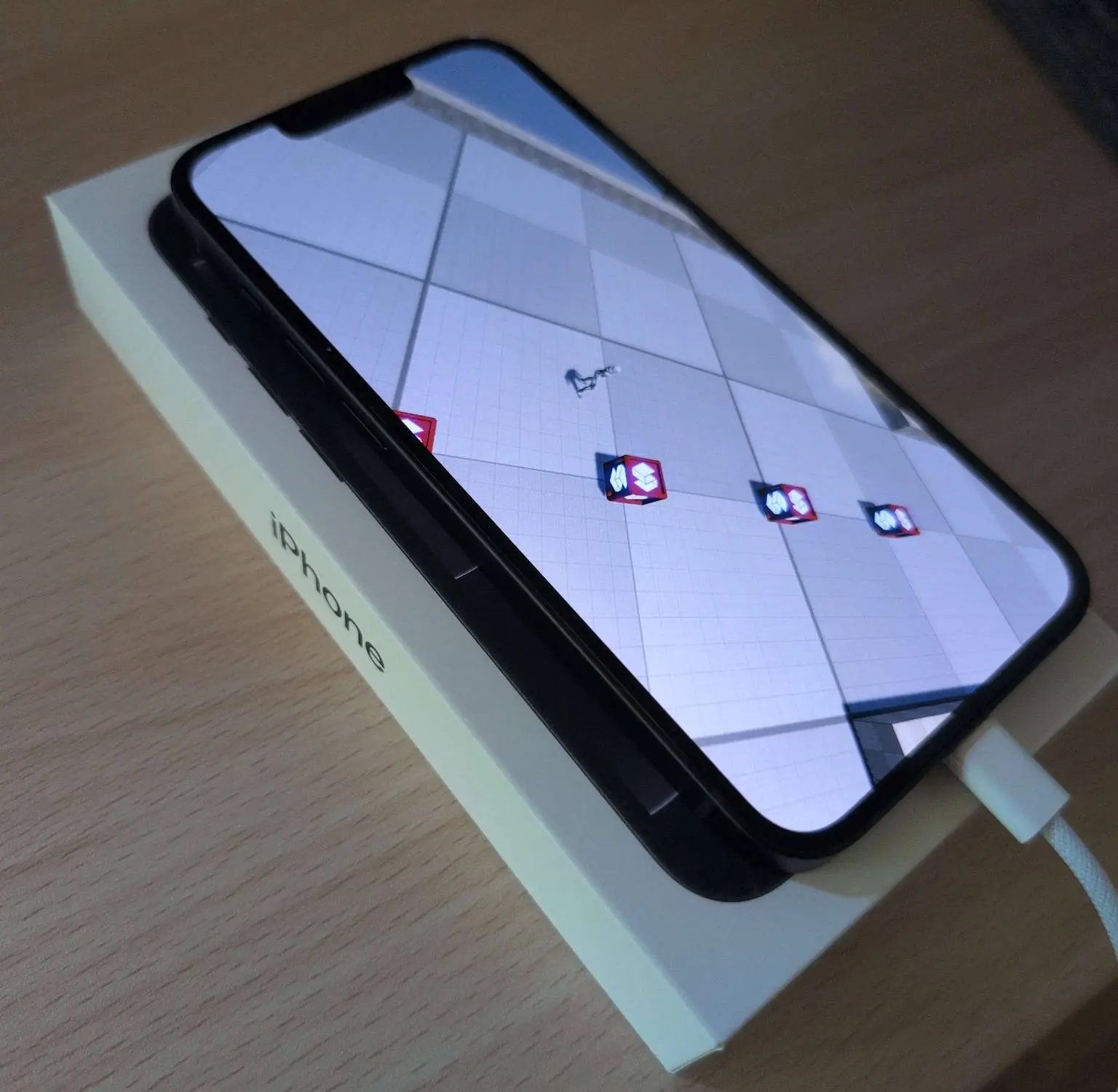
Up to this point, Stride has been a Windows-first engine. Other platforms were supported, but creating and running games on them would often lead to many problems. This update changes that.
All platforms have been brought back into shape and their test suite has been expanded to make sure they won't fall behind again. Additionally, with changes to the asset compiler, building projects on Linux and macOS now works the same as it does on Windows.
🎨 Overhaul of Vulkan, Direct3D 12 and SDSL 🔗
Stride's graphics API support was similar to platforms, as in you had a lot of options, but there was a clear winner that worked better than the rest. Direct3D 11 was the default API and was mostly feature complete, while Direct3D 12, Vulkan, OpenGL and OpenGLES were missing a lot of features and were generally less stable. This was especially noticeble on non-Windows platforms, where Direct3D 11 wasn't available.
Stride 4.4 addresses this problem by completely overhauling Vulkan and Direct3D 12. You should now expect your projects to all work the same, no matter of your choice of a graphical backend. OpenGL and OpenGLES have been removed as we shift our focus to supporting only modern APIs for easier maintainability. We are also considering removing Direct3D 11 in the next major release.
In addition to all of this, one of the other major changes with Stride 4.4 has been the overhaul of the SDSL compiler. Instead of stiching together text files, we now utilize a SPIRV-centric pipeline, where each SDSL shaders gets compiled only once and the engine then works with their bytecode directly.
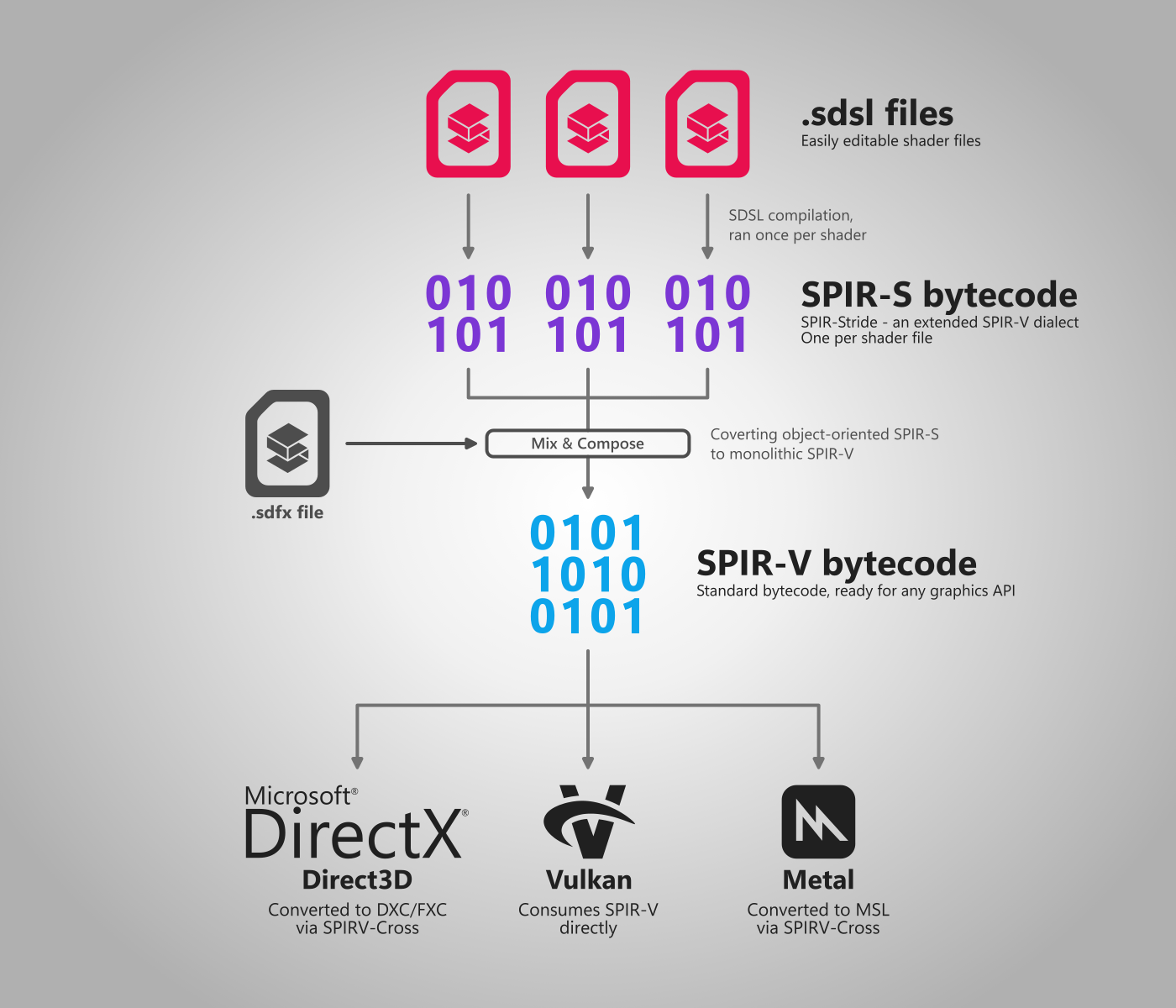
What this means for you:
- Faster compilation times.
- Improved stability.
- Far-better support for advanced features.
- Easier for us to add modern enhancements in the future, such as ray tracing.
⌨️ New stride CLI tool 🔗
Some tasks that previously required the use of Game Studio or the launcher can now be done directly from the command-line! By using the CLI tool you can install and manage versions of Stride, create new projects and launch Game Studio with simple commands.
For more information, visit the Stride CLI page of our documentation.
dotnet tool install -g stride.cli      # Install Stride CLI
stride sdk install                     # Install the latest version of Stride
stride new topdownrpg && cd TopDownRPG # Create a project from a template
stride studio                          # Open it in Game Studio
dotnet new templates are also available if you'd rather use the standard .NET tooling directly:
dotnet new install Stride.Templates
dotnet new stride-game -n MyGame
📦 Improved asset workflow 🔗
Working with asset paths in code has been made easier by the automatically generated Assets class, providing strongly typed URLs for all assets that are available in your project. Now instead of getting runtime "content not found" errors, you'll be able to catch missing assets at compile time.
// Old approach
var playerModel = Content.Load<Model>("Models/Player");

// New approach
var playerModel = Content.Load(Assets.Models.Player);
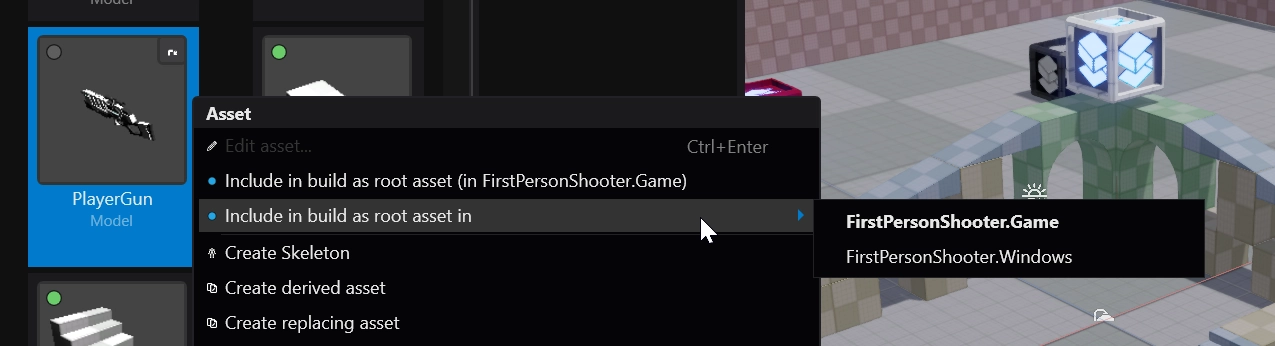
There have been additional changes to improve support for multi-platform projects and external packages. Adding assets to root now defaults to using the project package that an asset belongs to instead of the current one (like MyGame.Windows), ensuring that your assets work the same across different builds. Game Studio now tells you the name of the project package where the asset will be root and allows you to choose from alternatives.
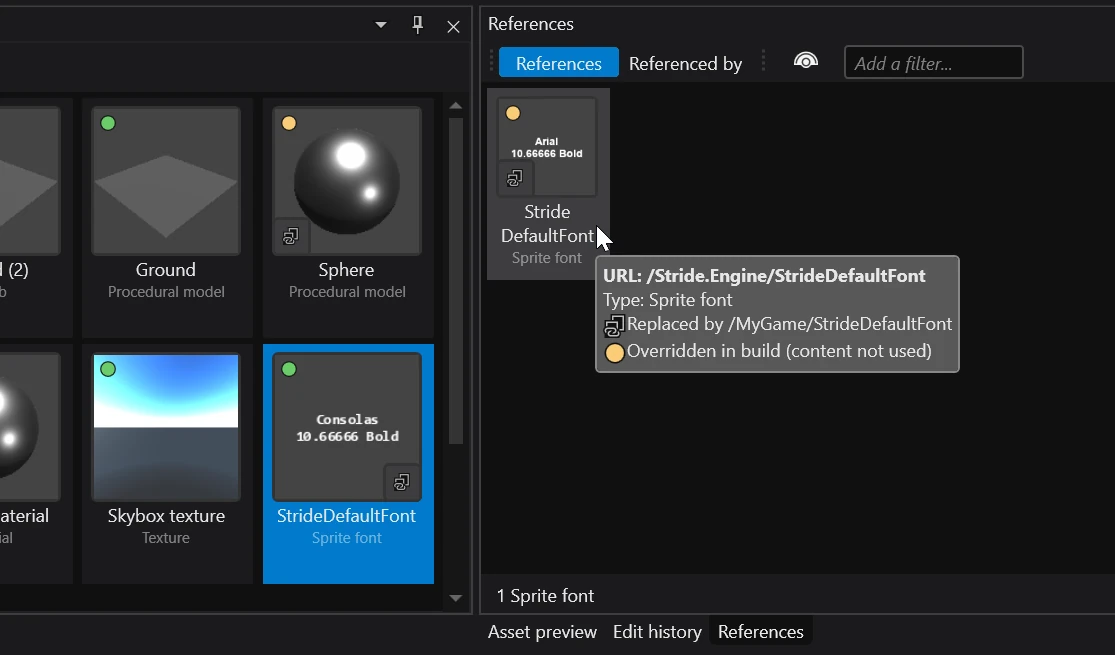
Asset URLs of external packages are now prefixed by a namespace, to ensure that there are no conflicts. You can also now create replacement assets, which allow you to override assets from external packages or even the engine itself.
Other improvements 🔗
As mentioned previously, this update is too large to summarize in this blog post. For more information about what changed, you can read the full writeup in the release notes.
Ongoing work on the engine 🔗
Cross-platform editor rewrite 🔗
The cross-platform rewrite of Game Studio is still ongoing. For those unaware, we are currently porting the editor from WPF to Avalonia in order to enable future support for Linux and macOS. This is a massive endeavour that will take a lot of time and effort, so if you're willing to help, check out the white paper and the Avalonia Editor Rewrite project on GitHub.
As part of this effort, we have recently updated the launcher which is now using Avalonia. Despite not being that different from its predecessor, the new launcher is still a big step for the eventual cross-platform editor support.
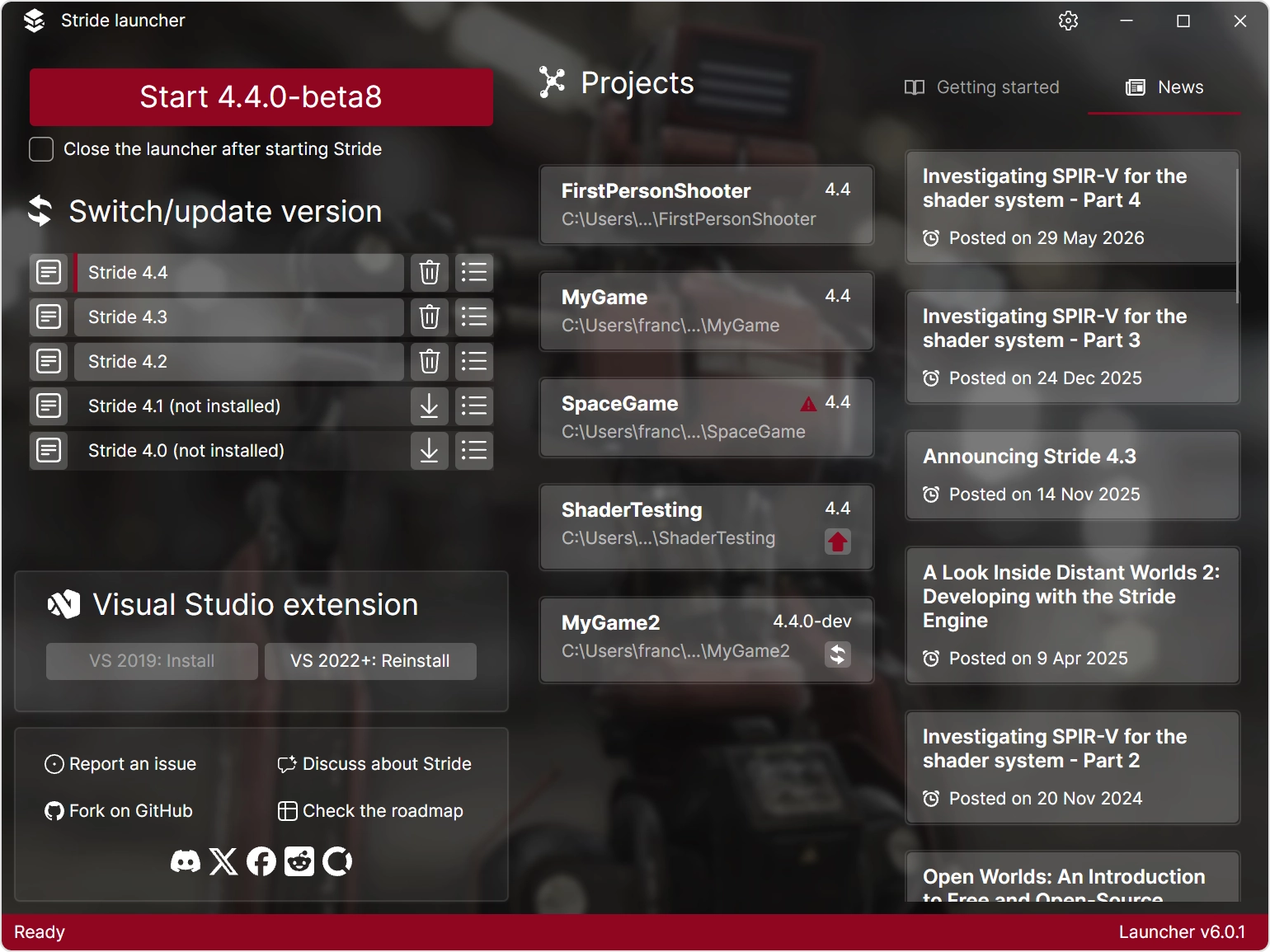
We also have one more announcement for Linux users looking to use the editor on their system today...
Game Studio can now run on Linux via Proton 🔗
For a long time, Wine (and Proton) couldn't open Game Studio, due to legacy code that didn't want to play nice with compatibility layers. This has however changed in 4.4, after doing some cleanup in our codebase.
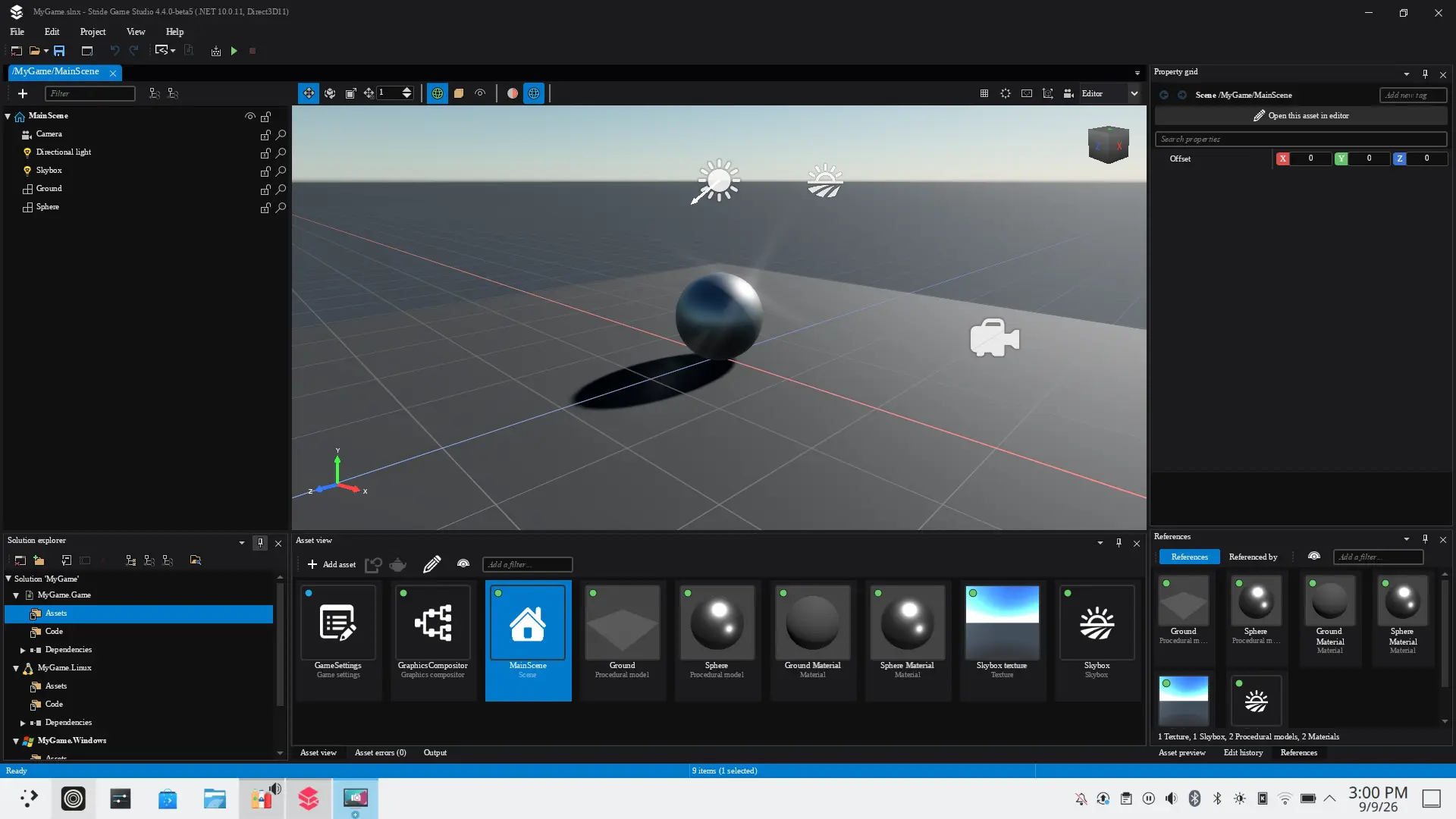
We know that this is not a perfect solution, but it's still a big step forward for Linux developers trying to use Stride. We have created a step-by-step guide in the documentation that should help you setup the editor on your machine.
Documentation 🔗
Stride's documentation has always been one of its biggest weakpoints. Work on it has mostly been stale with not many people willing to write new pages or update existing content. However, this has recently changed.
We are currently working on bringing the documentation up-to-date and restructuring it to support future content. So far, we have:
- Rewritten Get started, Graphics API and Platforms.
- Added new sections Assets, Install and update and Project.
- Created new pages for new features: NativeAOT, Replacement assets and Stride CLI.
- Removed outdated sections and pages.
We have also started documenting parts of Stride's internal architecture in the main engine repository to help other contributors navigate this large codebase. A copy of these pages is available on the documentation website.
Funding and Resource Allocation 🔗
Call for Skilled Developers 🔗
We are actively seeking skilled developers with experience in C#, the .NET ecosystem, mobile, XR, rendering, and game development. If you have these skills or know someone who does, we encourage you to get involved. There are opportunities to contribute to critical areas of Stride's development, supported by available funds.
Join Us on This Journey 🔗
We’re always excited to welcome new contributors to the Stride family. Whether it’s through code or content contributions, spreading the word, or donations, every bit helps us grow stronger. Check out all the ways to support the development in the documentation.
Links 🔗
- GitHub: https://github.com/stride3d/stride
- Website: https://stride3d.net/
- Documentation: https://doc.stride3d.net/latest/en/manual/
- Twitter: https://twitter.com/stridedotnet
- YouTube: https://www.youtube.com/@Stride3D
- Stride Community Toolkit: https://stride3d.github.io/stride-community-toolkit/index.html
Acknowledgements 🔗
We extend our heartfelt gratitude for all the hard work and donations we have received. Your generous contributions significantly aid in the continuous development and enhancement of the Stride community and projects. Thank you for your support and belief in our collective efforts.
In particular, we want to thank these donors:
Long-time Stride supporters 🔗
-
VVVV🥇

Diamond Striders 🔗
Platinum Striders 🔗
Gold Striders 🔗
4.4Release
Any comments? You can start 🗨 at GitHub Discussions or Discord.
Edit this page on .